

Recent post dropdown widget
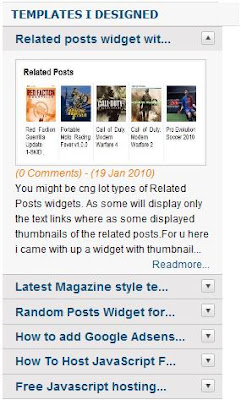
You might have seen different type of Recent post widgets showing Thumbnail with text or only text or only thumbnail. Those all widgets will show recent posts one by one in horizontal manner or vertical manner but will show all the posts. Here is a little different one which will show recent posts in a drop down manner as shown in top picture.
If you want to experience this, go to Info blog and check right side bar for the label Templates I designed.
NOTE: Please use firefox to experience this as this widget has some bug for IE with personal domain. If yyou dont use personal domain as i am using and if u have a blog address as xxxxx.blogspot.com then it will work perfectly on all browsers.
To insert this widget into ur blog follow the steps below
1) Log into ur blog and paste below code just before "]]></b:skin>"
.accordion {
float:left;
width: 260px;
border-bottom: solid 1px #c4c4c4;
}
.accordion h4 {
background: #e9e7e7 url(http://www.webdesignerwall.com/demo/jquery/images/arrow-square.gif) no-repeat right -51px;
padding: 7px 15px;
margin:0;
font: bold 120%/100% Arial, Helvetica, sans-serif;
border-top: solid 1px #c4c4c4;
border-bottom: none;
cursor: pointer;
}
.accordion h4:hover {
background-color: #e3e2e2;
}
.accordion h4.active {
background-position: right 5px;
}
.accordion p {
background: #f7f7f7;
margin: 0;
padding: 10px 15px 20px;
}
2) Now just copy and paste below code just before </head>
<script type='text/javascript'>
$(document).ready(function(){

$(".accordion h4:first").addClass("active");
$(".accordion p:not(:first)").hide();

$(".accordion h4").click(function(){
$(this).next("p").slideToggle("slow")
.siblings("p:visible").slideUp("slow");
$(this).toggleClass("active");
$(this).siblings("h4").removeClass("active");
});

});
</script>
3) Not last and final step. copy and paste below code at the place where u want to show ur widget.
<script language='JavaScript'>

imgr = new Array();
imgr[0] =
"http://sites.google.com/site/fdblogsite/Home/nothumbnail.gif";
showRandomImg = true;
jimgwidth = 220;
jimgheight = 120;
jfntsize = 12;
jacolor = "#E67C15";
jaBold = true;
jtext = "Comments";
jshowPostDate = true;
sumtitle = 25;
jsummaryPost = 200;
summaryFontsize = 12;
summaryColor = "#000";
numposts = 6;
label = "Blogger";
home_page = "http://ngsk.info/";

</script>
<div class='accordion'>

<script src='http://contact.dinhquanghuy.googlepages.com/j-label-fix.js' type='text/javascript'/>

</div>
Now change home_page url to ur blog address and label name to ur tag name.
hope u like this widget.
Related posts widget with thumbnails

You might be cng lot types of Related Posts widgets. As some will display only the text links where as some displayed thumbnails of the related posts.
For u here i came with up a widget with thumbnails which will really suits ur blogger templates and will not show duplicate entries.
to add this widget to ur blog follow these steps.
1) Login to ur blogger account and place below code exactly <Head> tag
<b:if cond='data:blog.pageType == "item"'>
<style type='text/css'>
#related-posts {
float:center;
text-transform:none;
height:100%;
min-height:100%;
padding-top:5px;
padding-left:5px;
}

#related-posts h2{
font-size: 1.6em;
font-weight: bold;
color: black;
font-family: Georgia, “Times New Roman”, Times, serif;
margin-bottom: 0.75em;
margin-top: 0em;
padding-top: 0em;
}
#related-posts a{
color:black;
}
#related-posts a:hover{
color:black;
}

#related-posts  a:hover {
background-color:#d4eaf2;
}
</style>

<script type='text/javascript'>
//<![CDATA[

//Script by Aneesh of www.bloggerplugins.org
//Released on August 19th August 2009
var relatedTitles = new Array();
var relatedTitlesNum = 0;
var relatedUrls = new Array();
var thumburl = new Array();
function related_results_labels_thumbs(json) {
for (var i = 0; i < json.feed.entry.length; i++) {
var entry = json.feed.entry[i];
relatedTitles[relatedTitlesNum] = entry.title.$t;
try
{thumburl[relatedTitlesNum]=entry.media$thumbnail.url;}


catch (error){
s=entry.content.$t;a=s.indexOf("<img");b=s.indexOf("src=\"",a);c=s.indexOf("\"",b+5);d=s.substr(b+5,c-b-5);if((a!=-1)&&(b!=-1)&&(c!=-1)&&(d!="")){
thumburl[relatedTitlesNum]=d;} else thumburl[relatedTitlesNum]='https://blogger.googleusercontent.com/img/b/R29vZ2xl/AVvXsEinbmlBXdPt2jaZvh7OFc8OJ2pqNc9x4d0VOskkO3ghQbs88u6LmEnx2MMcJzwGIk1tgOBebbAdYh7EZ7lkOuzKzXWGFmEQ0Wk6B-bPf7lmdFQWy-0DAWyikhD8Cmk7TP7xYj-XQ9Y3gCVK/';


}

if(relatedTitles[relatedTitlesNum].length>35) relatedTitles[relatedTitlesNum]=relatedTitles[relatedTitlesNum].substring(0, 35)+"...";
for (var k = 0; k < entry.link.length; k++) {
if (entry.link[k].rel == 'alternate') {
relatedUrls[relatedTitlesNum] = entry.link[k].href;
relatedTitlesNum++;


}
}
}
}
function removeRelatedDuplicates_thumbs() {
var tmp = new Array(0);
var tmp2 = new Array(0);
var tmp3 = new Array(0);
for(var i = 0; i < relatedUrls.length; i++) {
if(!contains_thumbs(tmp, relatedUrls[i]))
{
tmp.length += 1;
tmp[tmp.length - 1] = relatedUrls[i];
tmp2.length += 1;
tmp3.length += 1;
tmp2[tmp2.length - 1] = relatedTitles[i];
tmp3[tmp3.length - 1] = thumburl[i];
}
}
relatedTitles = tmp2;
relatedUrls = tmp;
thumburl=tmp3;


}

function contains_thumbs(a, e) {
for(var j = 0; j < a.length; j++) if (a[j]==e) return true;
return false;
}
function printRelatedLabels_thumbs() {
for(var i = 0; i < relatedUrls.length; i++)
{
if((relatedUrls[i]==currentposturl)||(!(relatedTitles[i])))
{
relatedUrls.splice(i,1);
relatedTitles.splice(i,1);
thumburl.splice(i,1);

}
}


var r = Math.floor((relatedTitles.length - 1) * Math.random());
var i = 0;

if(relatedTitles.length>0) document.write('<h2>'+relatedpoststitle+'</h2>');
document.write('<div style="clear: both;"/>');
while (i < relatedTitles.length && i < 20 && i<maxresults) {


document.write('<a style="text-decoration:none;padding:5px;float:left;');
if(i!=0) document.write('border-left:solid 0.5px #d4eaf2;"');
else document.write('"');
document.write(' href="' + relatedUrls[r] + '"><img style="width:72px;height:72px;border:0px;" src="'+thumburl[r]+'"/><br/><div style="width:72px;padding-left:3px;height:65px;border: 0pt none ; margin: 3px 0pt 0pt; padding: 0pt; font-style: normal; font-variant: normal; font-weight: normal; font-size: 12px; line-height: normal; font-size-adjust: none; font-stretch: normal;">'+relatedTitles[r]+'</div></a>');


if (r < relatedTitles.length - 1) {
r++;
} else {
r = 0;
}
i++;
}
document.write('</div>');

}

//]]>
</script>

</b:if>
2) Now just place below code at the place where u want to show ur related posts, may be at sidebar and mostly u will like to past it at the fotter of the post.
<b:if cond='data:blog.pageType == "item"'>
<div id='related-posts'>
<b:loop values='data:post.labels' var='label'>
<b:if cond='data:label.isLast != "true"'>
</b:if>
<b:if cond='data:blog.pageType == "item"'>
<script expr:src='"/feeds/posts/default/-/" + data:label.name + "?alt=json-in-script&callback=related_results_labels_thumbs&max-results=6"' type='text/javascript'/></b:if></b:loop><a href='http://www.bloggerplugins.org/2009/08/related-posts-thumbnails-blogger-widget.html' style='display:none;'>Related Posts with thumbnails for blogger</a><a href='http://www.bloggerplugins.org/' style='display:none;'>blogger tutorials</a>
<script type='text/javascript'>
var currentposturl="<data:post.url/>";
var maxresults=5;
var relatedpoststitle="Related Posts";
removeRelatedDuplicates_thumbs();
printRelatedLabels_thumbs();
</script>
</div><div style='clear:both'/>
</b:if>
Related post widget for blogger
You might be haring about Related posts widget for blogger which makes visiter to your blog to spend more time on your blog.This widget not only making visiter to spend more time on your blog reading your posts, by this your CTR will increase in google which inturn increases your ads from adsense or other means which give you good revenue.
WE all know WordPress has got many plug-ins which do the same purpose, but as such feature is not present in Blogger By default. We have various hacks and Tips for Blogger blogs already, with some popular ones for this Widget.
The basic difference in the related posts widget for Blogger and those for WordPress are : the WordPress Plug-ins are more customizable and actually relate posts considering category, tags and content. While the Related Posts for Blogger does so using only the Categories in which you place the post. So for Better optimality of the Widget, limit the number of categories to just one or two. More categories would mean too many related posts.
Here i have collected hack for related post by few of fellow bloggers.
1)From widgetsforfree
Here is a simple and stylish widget from Widgets for free with customizable style sheet.
2)From Tweaked hack by Jackbook
Jackbook had tweaked the the Original hack by Hoctro, and made it a single install widget, and also removed current article being listed in related articles. So the hack is quite simple and you can try it out too. My say: Read on - better hacks are coming. Jackbook – related post widget
By taking jackbook widget i am trying to make few modification which i will be posting very soon.
If you like my post or to correct or add another type of Related post widget please leave a comment or mail me at softwaretester@gmail.com
Thank you


